05 / the app
This is Substrate.
A real vault: notes on the left, live-rendered markdown in the middle, properties on the note. The sidebar’s “databases” and “dashboards” are just files like this one, grouped by their type: label.
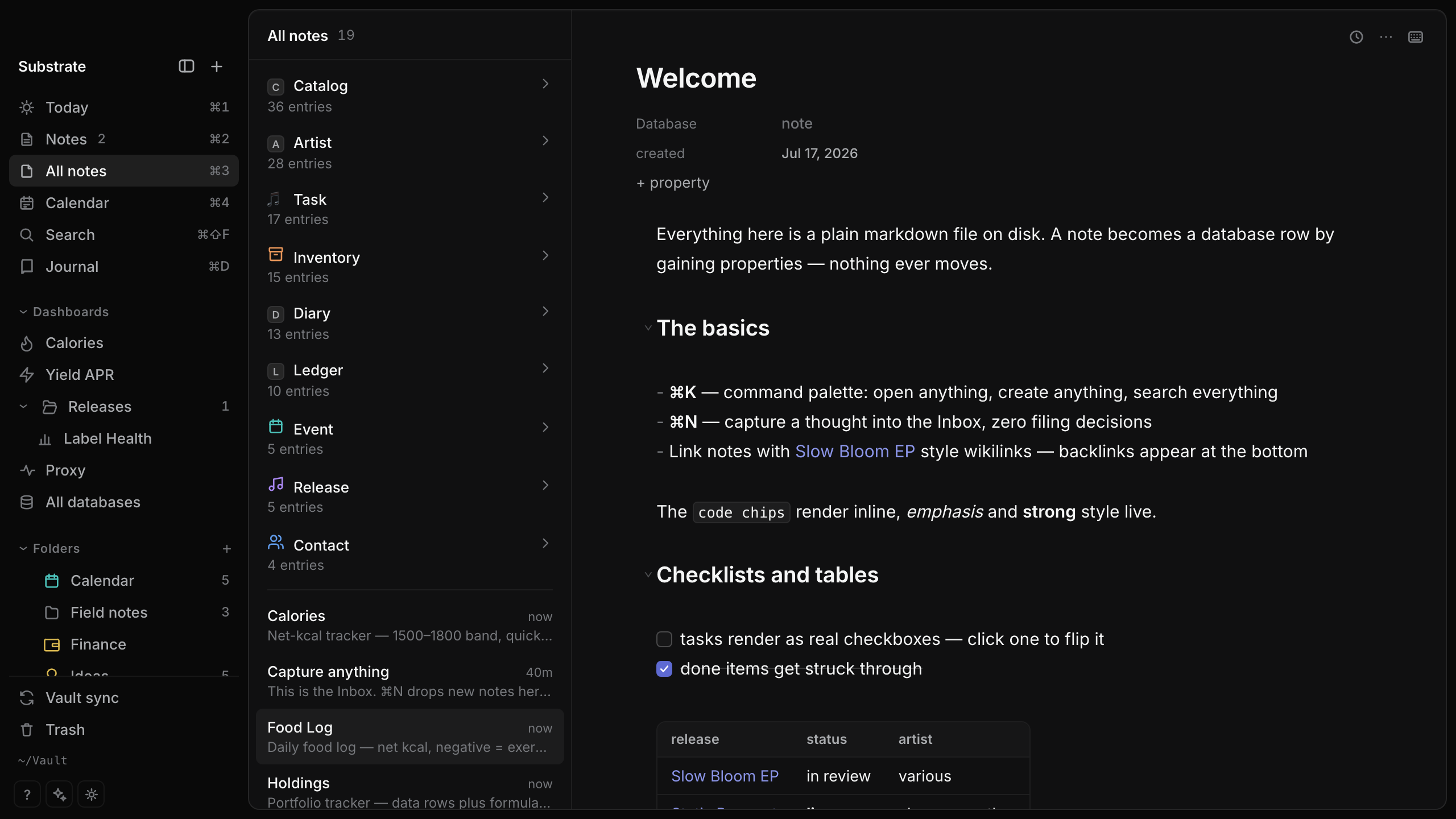
~/Vault · a working vault · databases in the sidebar, notes in the middle, live-rendered markdown right
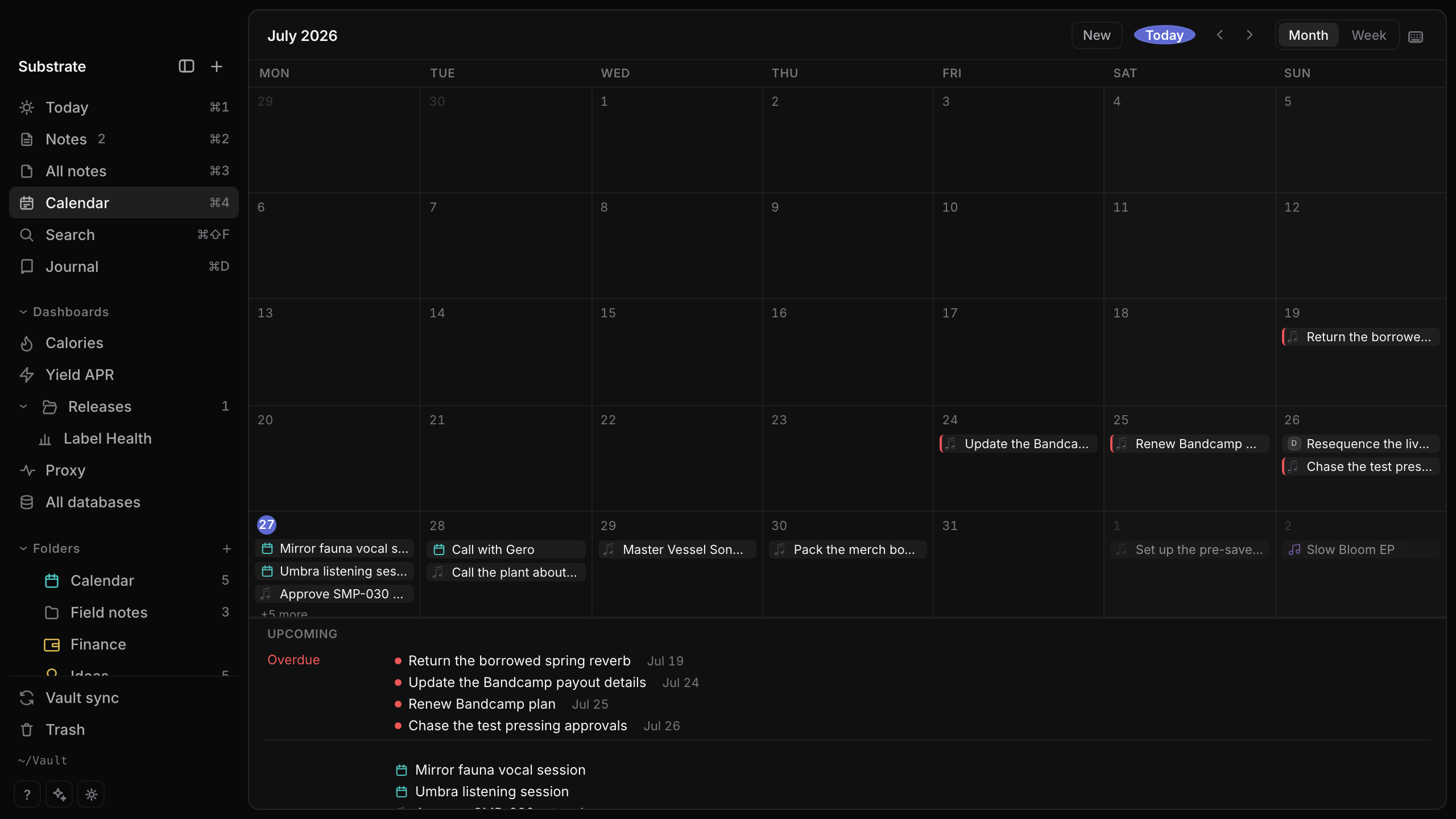
Calendar · any note with a date shows up — events, deadlines, journal days; the overdue rail is a saved query
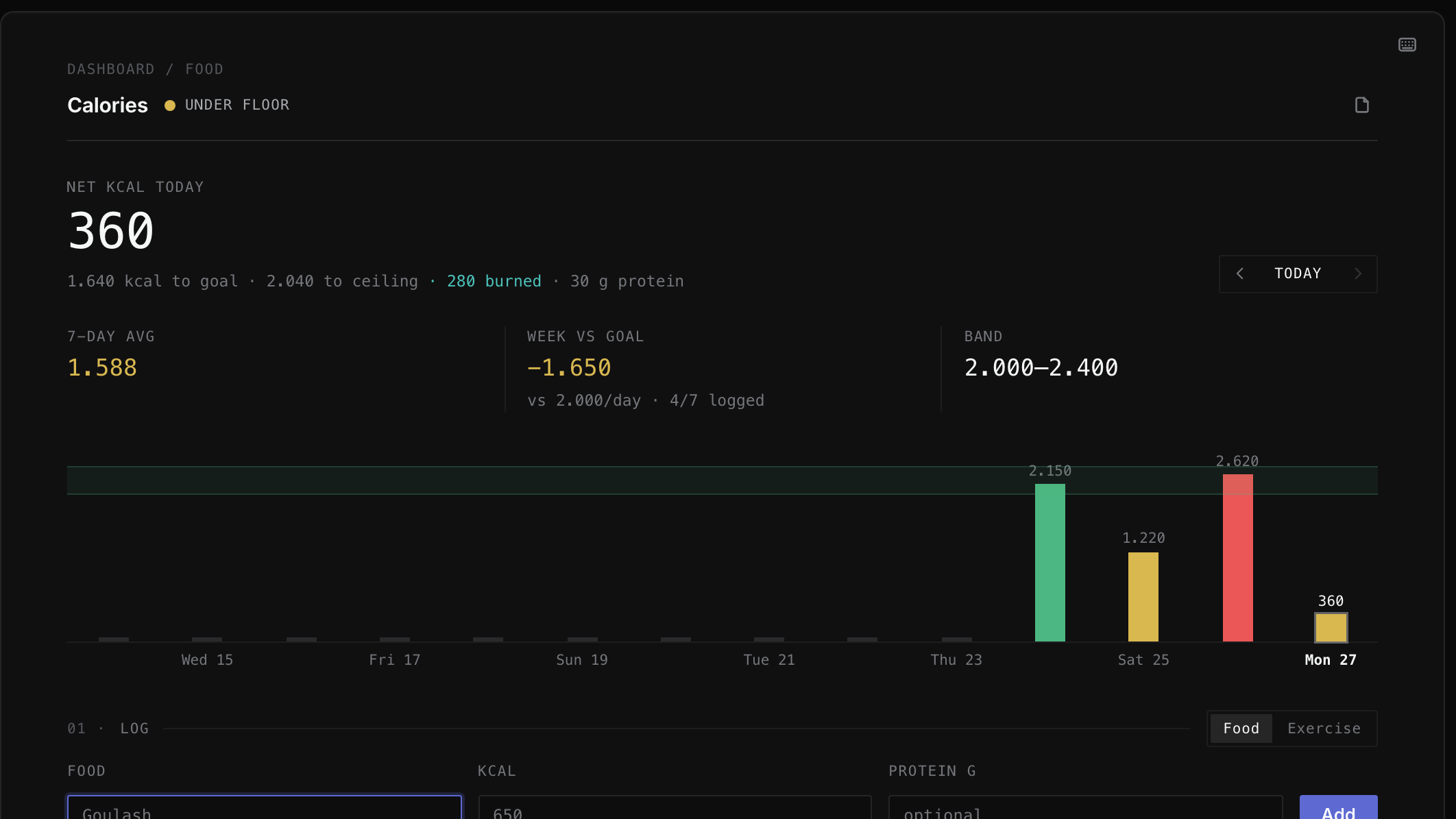
Calories.md · a daily tracker — goal band, week-vs-goal, a log form; the log rows live in a markdown table one file over
06 / surfaces
Dashboards over text files.
Stat cards, charts, live views, a log form — a real dashboard, and every number on it is derived from markdown files on disk. This one tracks yield:
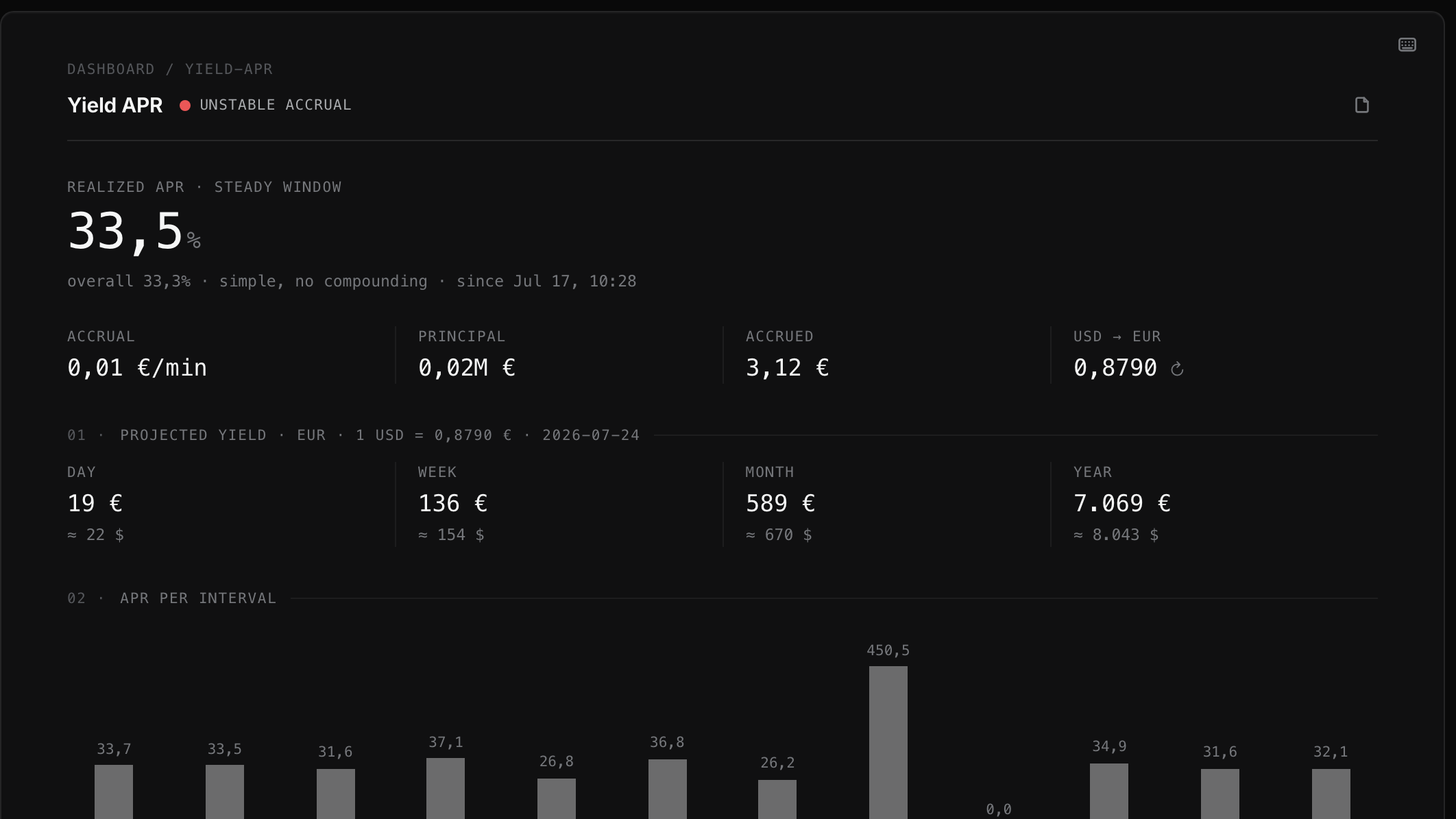
Yield APR.md · realized APR, projected yield, per-interval chart — every number derived from snapshot rows in the file
Where do the numbers come from? Sheets — formula tables in plain text. This is a whole one:
$ cat Finance/Holdings.md
---
type: sheet
---
```csv
asset,bucket,units,price_usd
WORLD-ETF,etf,30,98.5
BTC,crypto,0.08,64200
```
```formulas
value_usd = units * price_usd
total  = SUM(value_usd)
crypto = SUMIF(bucket, "crypto", value_usd)
value_eur = value_usd * FX("USD","EUR")
```
A spreadsheet that is also just a note.
That file is a working portfolio tracker: the rows are holdings, the lines below compute value, totals, and how much is in crypto — SUM, SUMIF, live currency rates, references across sheets. In the app you see a grid and charts; on disk it stays a note you could email to someone.
This layer simply doesn’t exist elsewhere: Notion’s formulas compute one row at a time — anything across rows or tables means rigging relations and rollups, and charts can’t read the result. Here a full spreadsheet engine runs over files grep can read.
SPEC — docs/sheets-spec.md · ENGINE TESTED IN CI
And this is the same kind of file, open in the app — the csv rows become a grid, the formulas become the totals rail underneath:
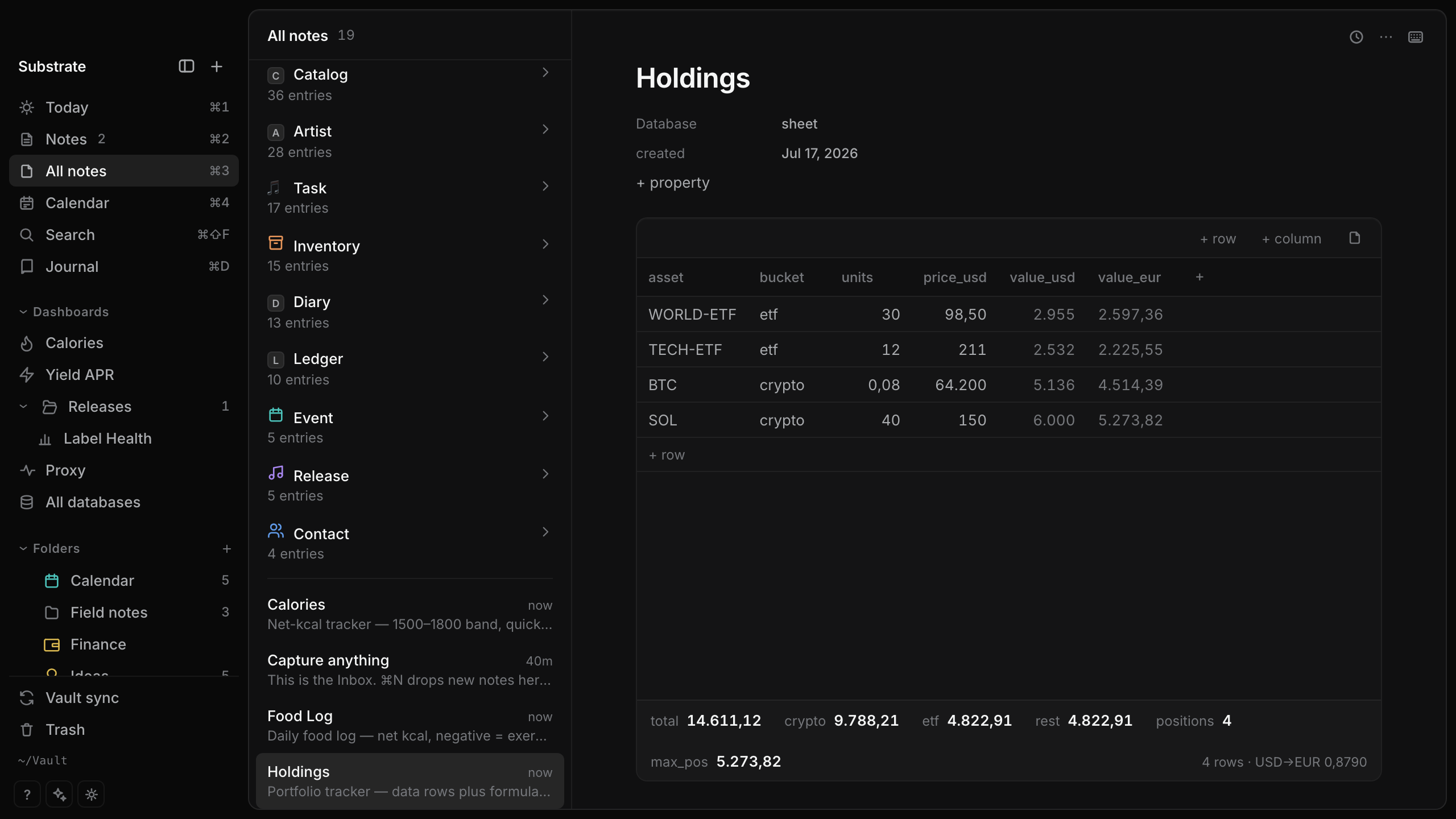
Holdings.md · the sheet rendered · totals, per-bucket sums and USD→EUR conversion computed from the file, live
07 / cookbook
Don’t start from a blank vault.
The repo ships a cookbook of dashboard recipes — each one a folder of plain markdown: the dashboard note plus the sheets and sample rows it binds to. Copy the files into your vault and the board renders with numbers on first open. That’s the whole install.
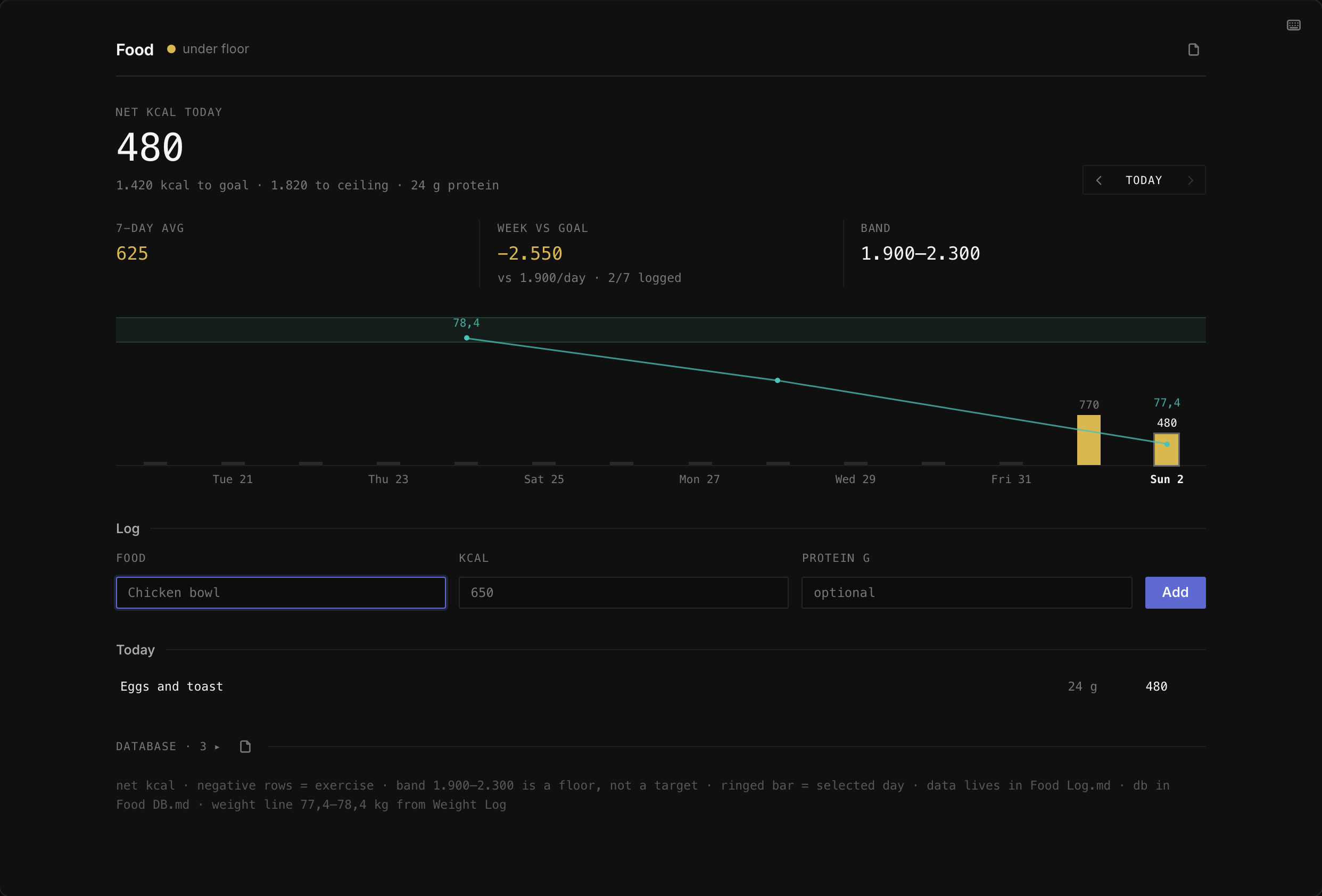
cookbook/food-log/ · three markdown files, copied in — the tracker above is what opens
8 recipes
Real boards, not demos
Portfolio cards, APR tracker, food log, curated news feed, home hub, release charts, a label-accounting workbook, a work index — grown in daily use, then genericized.
tested
Pinned to the demo vault
Every recipe file is byte-identical to examples/vault/ and parsed by the same engine code in CI — a recipe that drifts fails the suite.
agent food
An index your agent can read
cookbook/index.json declares each recipe’s files, what it expects, and how to adapt it. “Set this up against my real data” is a one-line prompt.
08 / files
The files are the app.
No proprietary database underneath — the markdown on your disk is the only source of truth. Substrate is just a fast window onto it. Edit a file in any other app and the change is live before you switch back.
$ cat Contacts/Noa.md
---
type: contact
role: artwork
status: active
---
Brief sent for [[Slow Bloom EP]] —
stems for the motion piece due Friday.

# a text file. also a database row.

$ echo "- [ ] send stems to Noa" >> Today.md
Every note is a page anything can open.
That terminal is showing a contact card — and it’s just a text file you could read on any computer made in the last forty years. The labels on top (type, role, status) are what make it a database row. Change the file from anywhere — another app, a script, that echo line — and it’s in Substrate before you switch back.
FOR THE NERDS: FRONTMATTER IS THE SCHEMA, GREP IS A QUERY ENGINE — docs/vault-format.md
09 / agents
Agents don’t get an API here.
They get the files.
No UI-only data, boring parseable formats, external edits picked up live — an agent filing your inbox at 3am is a designed use, not a hack. And once agents can read everything on your machine, a vault that never leaves it uninvited stops being a nerd feature and becomes the point.
Not “AI-powered.” Legible.
There’s no model inside Substrate and no tokens to buy. The claim is stronger and cheaper: the vault is plain text with documented conventions, so any agent — Claude, a cron script, you in a terminal — can read and write it directly.
EVERYTHING THE UI DOES TO YOUR DATA IS ACHIEVABLE BY EDITING FILES.
agent › file today's captures
read   Inbox/ — 4 untyped notes
write  type: contact → Contacts/Noa.md
write  type: release → Releases/Vessel Songs.md
write  type: task ×2 → Tasks/
vault › watcher: 4 files changed, index live
10 / features
Narrow, but finished.
A smaller surface done properly beats a wide surface at 80%.
SUM, SUMIF, cross-sheet references, live FX. Notion’s formulas stop at one row; these don’t.11 / only here
Things you can’t take elsewhere.
The claims that don’t have a Notion/Obsidian equivalent — every one shipped and checkable in the repo. The full register, including what’s deliberately not advertised yet, lives in docs/differentiators.md.
vault doctor, a read-only integrity report. Your agent gets documentation, not reverse-engineering.repeat: every 3 weeks in plain frontmatter — no RRULE anywhere. One file, many occurrences; delete offers this-one / following / all.12 / principles
Built on a few stubborn ideas.
Files are the only truth.
Export a PDF to send someone, sure. But you’ll never need to export your data — it was never inside.
Nothing phones home.
No account, no telemetry, no cloud — your vault never leaves your machines uninvited. The only outbound calls are features you can see: currency rates for sheets, titles for pasted links.
Speed is a feature, not a benchmark.
The app should feel like a room, not a machine.
Agent-native, by design rule.
Boring formats, documented conventions — the agent uses the same door you do.
Built for one person first.
Not a product committee — a daily driver. Every feature exists because someone needed it that week.
$ don’t trust the copy — read the source
13 / switching
Leaving Notion?
The databases, the views, the everything-in-one-place — minus the loading spinners, the vendor account, and the API between your agent and your own notes.
1
Export from Notion
Settings → Export all workspace content (markdown & CSV).
2
Drop it in your vault
Pages are markdown already — notes the moment they land. Database rows arrive as CSV; typing them as frontmatter is the real migration.
3
Migrate one database at a time
Lane by lane — each database lands whole before the next begins. No big-bang cutover.
honesty clause: Notion is still better at real-time multiplayer collab. Substrate is single-user by design — that’s why it’s fast.
14 / price
Free and open source. That part’s simple.
Same app, same features, your call. A donation nag may appear someday, rarely — one euro makes it disappear forever, and with the source right there you can always build the version without it.
15 / faq
Fair questions.
Where is my data, exactly?
In ~/Vault (or any folder you choose): ordinary text files you can open in anything, plus a small .vault/ folder holding your database settings and saved views — also plain text. You can read all of it right now, no Substrate required.
Isn’t this just Obsidian?
Closest neighbor, different bet. Obsidian answered “who owns the files?” — Substrate starts there and asks what the files can do. Four differences that compound:
core, not plugins. In Obsidian, structure is assembled — Bases for tables, plugins for sheets and dashboards, each with its own format and update cycle. Here typed databases, sheets, and dashboards are one native core: one documented convention, no stack to keep standing.
computation. Sheets are formula tables in plain text; dashboards bind stat cards, charts, and live views to the results — a spreadsheet-and-dashboard layer Bases doesn’t reach. Your finances, your release pipeline: computed, not just collected.
agent-first, not agent-tolerant. Both are “just files,” but here the conventions are designed to be operated: documented spec, boring YAML, external edits as the designed path — the index is live before you ⌘-tab back.
open source. Obsidian is free but closed. Every claim on this page is checkable in the repo.
What happens if the project dies?
Nothing. Your vault is markdown — every editor on earth opens it. That is the whole point of building on files instead of a database.
Does it phone home?
No telemetry, no analytics, no account, no update pings you didn’t ask for. Two boring exceptions, both user-visible features: sheets fetch currency rates, and pasting a URL fetches its title. The source is open so you don’t have to take our word for it.
Is the App Store build different?
No — same app, same features. It’ll pay for the signed one-click install and support development. The listing will say exactly this.
iPhone? Windows? Linux?
macOS first. An iOS build is in active development — it syncs directly to your own Mac, no third party in the path; end-to-end encrypted relay sync is the committed design. Windows/Linux aren’t planned — the roadmap follows its owner’s needs, honestly stated.